If you’re in the market for a new restaurant point of sale (POS) system, you’ve probably considered two of the most popular options out there: TouchBistro vs Toast. That’s where this guide comes in. We’ve done your homework for you and conducted a head-to-head restaurant POS system comparison of TouchBistro vs Toast on all the features that matter to today’s restaurateurs.
TouchBistro vs Toast Key Takeaways:
- TouchBistro: TouchBistro is best for single and mutli-location restaurants looking for an iPad-based POS that can bridge the gap between the dining room and the back office.
- Toast: Toast is best for niche and enterprise restaurant concepts in need of a more bespoke and flexible Android POS solution.
Quick Comparison of TouchBistro vs Toast:
| TouchBistro | Toast |
| Exclusively designed for restaurants | Designed for restaurants and retail |
| Runs on iOS and Apple iPad tablets | Runs on an Android and proprietary Android hardware |
| Robust native solutions | Extensive integrations |
| Starts at $69/month USD | Starts at $0-69/month USD |
| Best for single and multi-location restaurants | Best for large-scale multi-location restaurants |
The information contained on this site is accurate as of the time of publication.
Compare the top restaurant POS systems on features, pricing, payments, and more.
Which Restaurant POS is Better, TouchBistro or Toast? An Overview
Both TouchBistro and Toast are industry-leading POS systems built for modern restaurant management. Both companies are highly rated according to sites like Forbes and Business.com, and are designed specifically to meet the needs of restaurants, cafes, bars, breweries, and other foodservice establishments.
But while TouchBistro and Toast may seem similar upon first glance, there are some important differences between the two systems. Below, we’ll provide a quick overview of Toast vs TouchBistro, including how the systems differ and what that means for restaurateurs weighing their POS options.
| TouchBistro | Toast | |
| Regional Availability | CAD, U.S., Mexico, U.K., and more | U.S., CAD, U.K., and Ireland, and Australia |
| POS System | Cloud-based | Cloud-based |
| Operating System | iOS | Android |
| Hardware | Apple iPads | Proprietary Android hardware |
Are TouchBistro and Toast Cloud-Based POS Systems?
Both TouchBistro and Toast are cloud-based systems, which means that your data is stored in the cloud on remote servers. Cloud-based systems allow you to access your information remotely over the internet, which is not the case with traditional, legacy POS systems.
Offline mode is available for both TouchBistro and Toast POS. This offline mode ensures that if the internet goes out, staff can continue to use the POS to update and close out orders and accept offline payments. TouchBistro POS also continues speaking to your Kitchen Display System (KDS), which means you can continue sending orders to the kitchen.
What Software Operating Systems Do TouchBistro and Toast Use?
One major difference between TouchBistro vs Toast is that Toast is an Android POS system and TouchBistro is an Apple POS system.
Toast is powered by an Android operating system and uses proprietary Android hardware. Android systems are known for their flexibility and customized solutions, which can be a plus if you need a bespoke solution for your restaurant. However, the Android operating system comes with a steep learning curve and updates can be fragmented due to the variances in available hardware. And according to the Wall Street Journal, Android systems are the primary target of malware, meaning they are at a higher risk of security breaches.
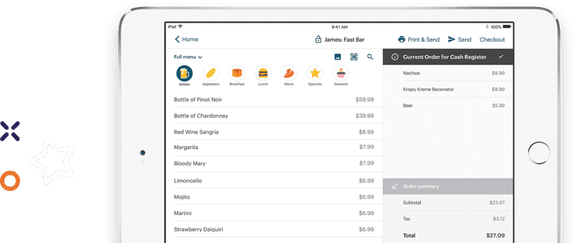
In contrast, TouchBistro runs on Apple’s iOS operating system and uses Apple hardware. The biggest benefit of iOS is that it’s a closed platform, meaning it’s less virus-prone than Android systems and updates are rolled out seamlessly across devices. And while iOS offers fewer opportunities for customization, this can actually be a good thing. Less customization results in more consistency, meaning the user-friendly system is easy for staff to pick up – especially if they’re already familiar with Apple products.
“If you can use an iPad, you can use TouchBistro.” Baylee Hood, Director of Operations & Training at HARVEST Clean Eats
Where are TouchBistro and Toast Available?
Both TouchBistro and Toast primarily operate in the U.S. and Canada. However, there are some small regional differences to take note of.
Toast is available in the U.S., Canada, U.K., Ireland, and Australia. Its full feature suite is most mature in the U.S., but many key products, including online ordering, loyalty, delivery, and Toast Tables, are now live in Canada. Some modules like Toast Payroll and Toast Capital remain U.S. exclusive.
TouchBistro is also available in the U.S., Canada, Mexico, and the U.K. TouchBistro offers virtually the same product suite in the U.S. and Canada, so customers do not have to worry that certain products may not be available in their region. In places outside of North America, some add-on features are unavailable.
A POS Feature Comparison: TouchBistro vs Toast
TouchBistro and Toast offer virtually the same set of core POS features, all of which help to make running your restaurant easier and more efficient.
| Core POS Features | TouchBistro | Toast |
| Menu Management | ✔ | ✔ |
| Staff Management | ✔ | ✔ |
| Floor Plan Management | ✔ | ✔ |
| Tableside Ordering | ✔ | ✔ |
| Reporting | ✔ | ✔ |
| 1:1 Onboarding | ✔ | ✔ |
| Customer Support | 24/7/365 (North America-based) | 24/7/365 |
When you compare Toast vs TouchBistro on core POS features, both platforms are equipped with the following:
- Menu Management: Menu management features allow operators to build and manage multiple menus and menu categories.
- Staff Management: Staff management features equip operators with essential tools to manage employees, like personalized accounts and employee-specific access permissions.
- Floor Plan Management: Virtual floor plans allow operators to design their restaurant floor plan, take orders by table, move parties around, and more.
- Tableside Ordering: Both Toast and TouchBistro offer POS tablets that can be taken tableside for faster and more accurate order taking.
- Reporting: Real-time and end-of-day cloud reporting on everything from sales to staff activity.
Though the two platforms are very similar, Toast does offer a bit more when it comes to enterprise functionality. Toast has more experience with large franchises and therefore some of its POS features, such as its multi-location menu management features, are more customizable, which may be a plus for large, nation-wide restaurant chains. However, most single and multi-location operators will not need this level of customization. In fact, the sheer number of complex functions that Toast offers can sometimes make navigating the software overwhelming and slow down the initial training process.
Though TouchBistro is missing some enterprise functionality, the system is equipped with robust multi-unit management features. For instance, TouchBistro allows multi-venue owners to easily create, manage, and bulk-edit menus across multiple locations, for quick and seamless multi-location management from a single device. Not to mention, all of TouchBistro’s features are designed with ease of use in mind, so you never have to worry about complicated software slowing you or your staff down.
Comparing Toast, TouchBistro, and Square POS Features for Restaurants
If you were to compare Toast vs TouchBistro vs Square for Restaurants, you’d find that all three offer similar POS features. The only difference is that some of Square’s features are a bit limited in their functionality, and Square reporting and analytics tools are more basic. But for the most part, Toast, TouchBistro and Square are all comparable when it comes to core POS features.
Compare the top restaurant POS systems on features, pricing, payments, and more.
Hardware: Comparing Android vs iPad POS Systems for Restaurants
Toast uses Android hardware and TouchBistro uses Apple hardware (iPads), which is a major difference between the two systems.
| Hardware Options | TouchBistro | Toast |
| Handheld Terminal | iPad, TouchBistro One | Toast Go 3 Handheld Android devices |
| Baseline Countertop Terminal | iPad | Toast Flex 3 Terminal, Toast Flex 14″ Terminal, and Elo Terminals |
| Kitchen Display System (KDS) Screen | iPad, Samsung Galaxy Tab S6, Lenovo Tab P11 Pro, Kitchen Armor, Geekland, and Microtouch | Toast Flex for Kitchen and the Elo Kitchen Display Screen |
What Hardware Does Toast Offer?
Toast requires customers to purchase own hardware, which includes its proprietary Toast Flex tablets, Elo Touch tablets, and custom-built handheld devices like Toast Go 3 — all of which run on an Android operating system.
Android tablets are well suited to restaurants and most customers appreciate the hardware’s durability. However, Toast’s strict hardware requirements do come with some potential drawbacks. The biggest complaint from operators is that you cannot run Toast’s software on your own tablets or existing hardware. So if you switch to Toast from another solution, you must buy their devices, which is an expensive prospect. This also makes it harder to switch if your needs change because it means you’ll have to purchase an entirely new setup. In other words, you cannot repurpose your hardware if you leave Toast.
Beyond the technical considerations, it’s also important to think about the user experience. If you are already familiar with Android devices, Toast’s hardware will be nothing new. However, if you (or your staff) primarily use Apple devices (i.e. iPhones or iPads), Toast’s Android tablets come with a steeper learning curve, which could slow down the training process. Not to mention, initial installation can be more complicated and requires the oversight of an authorized technician.
In addition to Toast’s Android tablets, other hardware options include KDS screens, printers, payment terminals, routers, and network devices.

What Hardware Does TouchBistro Offer?
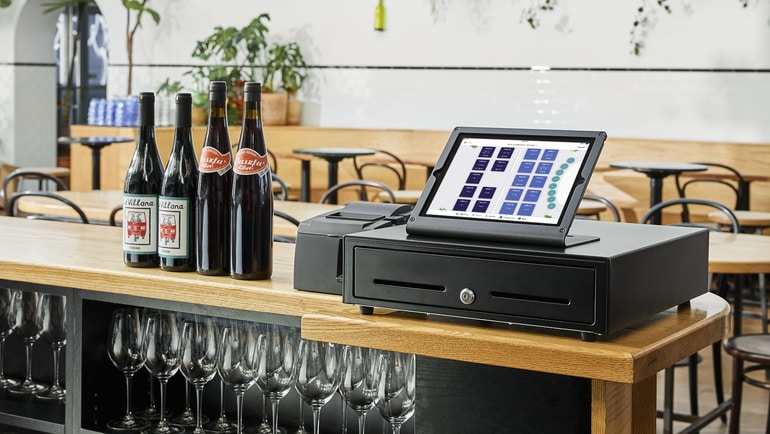
TouchBistro runs on iOS and iPads are the main hardware option. Like Toast, this means that you’re limited to a fairly small selection of available tablets. However, if you’re switching from another iPad POS system, you could save a lot on upfront costs. Not to mention, used iPads are incredibly easy to source in the event that something breaks – no need to contact your POS provider and wait for a replacement.
In addition to being readily available, iPads also have some major technological advantages. Unlike Android devices, iPads integrate seamlessly with iOS software. This is because Apple owns both the hardware (the iPad) and the software (iOS) so the two are designed to work in tandem with one another for seamless integration. As a result, iOS security updates will roll out automatically across all Apple devices, ensuring your software is never out of date.
Finally, iPads are a very intuitive out-of-the-box solution – even for staff who aren’t familiar with Apple devices. This allows for a quick, DIY setup and can help to speed up the training process, making it easier for staff to troubleshoot if issues arise.
In addition to the iPads that run your POS software, TouchBistro’s hardware options also include a cash drawer, printers (impact printer, thermal printer, ad sticker printer), payment terminals, routers, network devices, and multiple KDS screen options.
Comparing Toast and TouchBistro Payment Fees
Payments
Toast and TouchBistro both offer integrated payment processing solutions, but the rates differ.
| Payment Processing Solutions | TouchBistro | Toast |
| Payment Types Accepted | Credit, debit, check, and mobile wallets | Credit, debit, check, mobile wallets, and automated clearing house (ACH) |
| Payment Processing Rates | Custom-quoted | 2.49% to 3.69%, plus a $0.10 to $0.30 fixed fee per transaction |
| Pre-Authorized Bar Tabs | ✔ | ✔ |
| Quick Response (QR) Codes | ✔ | ✔ |
| Invoices | ✔ | ✔ |
| Offline Payments | ✔ | ✔ |
As noted, both TouchBistro and Toast offer integrated payment processing solutions for your restaurant. The benefit of using an integrated payment processing solution is that all your data flows directly from your POS through to your payment terminals, saving your staff time and eliminating errors caused by manual entry.
Toast’s Payment Processing Fees
Toast’s payment processing rates start at 2.49%, plus 0.10 cents per transaction for customers who pay for their hardware upfront. However, if you choose the cheaper Starter Kit plan, you’ll be locked into Toast’s premium payment processing rates, which can be as high as 3.69%, plus $0.30 per transaction, according to Merchant Maverick. In short, if you want better payment processing rates, you need to be prepared to pay for all your hardware upfront.
It’s also worth noting that Toast’s payment processing agreements allow them to increase rates at any time. Merchants on reddit report a recent increase in March of 2026.
Similarly, customers have complained about other, hidden fees with Toast. For example, in June of 2023, Toast announced it would be introducing a 99-cent fee paid by guests on orders of $10 or higher placed through Toast’s online ordering channels. This charge was implemented as a hidden fee on consumers’ bills, which many operators viewed as deceptive Toast later reversed course on this decision after operator pushback.
TouchBistro’s Payment Processing Fees
TouchBistro’s payment processing rates are custom-quoted because they vary depending on your venue type and volume of business. The rate also varies for card present (CP) transactions (payments made in the restaurant with a physical card) vs card not present (CNP) transactions (payments made remotely for things like online orders). Once your rate has been locked in, TouchBistro is transparent and upfront about its terms, so you always know exactly what you’re paying for, without any hidden fees.
Comparing TouchBistro vs Toast Add-On Solutions
TouchBistro and Toast offer many of the same add-on solutions, including online ordering, reservations, marketing, and more.
| Add-On Solutions | TouchBistro | Toast |
| Integrated Payments | ✔ | ✔ |
| Inventory | ✔ | ✔ |
| Labor Management and Staff Scheduling | ✔ | ✔ |
| Online Ordering | ✔ | ✔ |
| Integrated Delivery | ✔ | ✔ |
| Reservations | ✔ | ✔ |
| Gift Cards | ✔ | ✔ |
| Loyalty and Customer Relationship Management | ✔ | ✔ |
| Marketing | ✔ | ✔ |
| Back Office Management | ✔ | ✔ |
| Self-Serve Kiosks | ✘ | ✔ |
| Kitchen Display System (KDS) | ✔ | ✔ |
| Digital Menu Board | ✘ | ✘ |
When comparing Toast vs TouchBistro, you’ll find that both offer the following add-on features:
- Payments: TouchBistro and Toast offer integrated payment processing services, so payments flow directly from payment terminals into the POS without any manual data entry required.
- Inventory: TouchBistro Inventory Management and xtraCHEF by Toast are advanced inventory management solutions with a digital database of all your items and up-to-date counts of your consumables.
- Labor Management: TouchBistro and Toast each offer add-on staff scheduling and labor management tools that make it faster and more cost-effective to manage staff.
- Online Ordering: TouchBistro Online Ordering and Toast Online Ordering allow customers to order directly from a restaurant’s website and the order is processed through the POS in real-time – commission-free.
- Delivery: Both TouchBistro and Toast offer delivery solutions that allow operators to access an on-demand network of local drivers for quick and convenient door-to-door delivery.
- Gift Cards: TouchBistro and Toast customers can add on branded physical gift cards and/or digital gift cards, each with multi-location reconciliation.
- Loyalty and CRM: TouchBistro and Toast both have an integrated CRM and rewards program that helps drive repeat visits.
- Marketing: Both TouchBistro and Toast offer marketing solutions that help restaurants create and automate custom marketing campaigns.
- Profit and Back Office Management: Both TouchBistro and Toast offer back office solutions that help you manage inventory, invoicing, bill payments, and more.
- Reservations: TouchBistro Reservations and Toast Tables are integrated reservations management and waitlist systems that let guests reserve tablets online and help restaurants manage their bookings.
- Kitchen Display System (KDS): Both TouchBistro and Toast offer a digital kitchen display system that improves efficiency by displaying order tickets sent directly from the POS.
Toast also offers a few additional add-on options that TouchBistro does not. For instance, the company offers a self-ordering kiosk solution, which allows guests to place their orders independently on a touchscreen tablet for quick and easy customization. Orders are then sent directly from the kiosk to the KDS. Toast also offers a website builder as part of its Digital Storefront Suite (though it is only available to U.S. customers).
In contrast, some of TouchBistro’s add-ons are more robust than Toast’s, including its reservation management software. TouchBistro Reservations is a complete reservation and guest management platform that allows you to accept and manage mobile and web reservations. These reservations sync directly to your POS for a seamless flow of information between the front of house and back of house. Restaurants that use TouchBistro Reservations are also automatically listed on the TouchBistro Dine platform, allowing them to tap into an existing customer network.
Toast also has its own in-house reservations solution called Toast Tables. Toast Tables integrates with the brand’s POS, making it easier for servers to manage bookings in real time. However, one major drawback to the solution is that there’s no online discovery platform for diners to find new restaurants and book a table. This limited reach means that the solution is only useful to restaurants that already have a strong website presence and can expect diners to specifically come to their website to make a booking.
How Much Do Toast’s Add-Ons Cost?
Toast’s add-ons range from $25 per month for solutions like Gift Cards, to more than $250 per month for solutions like xtraCHEF Pro Tier. According to Merchant Maverick, Toast’s Payroll & Team Management Bundle is also a major recurring cost for many customers at $90 per month, plus $9 per employee.
Compare the top restaurant POS systems on features, pricing, payments, and more.
Comparing Toast and TouchBistro Integrations
TouchBistro and Toast integrate with many of the same leading restaurant-industry solutions, however, Toast offers significantly more integration options.
| Integration Partners | TouchBistro | Toast |
| Online Ordering and Delivery | ✔ | ✔ |
| Reservations | ✘ (native solution, TouchBistro Reservations) | ✔ |
| Loyalty | ✘ (native solution, TouchBistro Loyalty) | ✔ |
| Marketing | ✘ (native solution, TouchBistro Marketing) | ✔ |
| Staff Management, HR, and Payroll | ✔ | ✔ |
| Inventory Management | ✔ | ✔ |
| Accounting | ✔ | ✔ |
| Reporting and Analytics | ✔ | ✔ |
A comparison of Toast POS vs TouchBistro shows that both offer integrations for the following kinds of services:
- Online Ordering and Delivery Marketplaces: Both TouchBistro and Toast integrate with third-party apps, such as DoorDash, as well as aggregators like Ordermark and Deliverect, which sync multiple different third-party ordering apps with your POS system.
- Staff Management, HR, and Payroll: TouchBistro and Toast customers can choose to integrate with employee scheduling and labor management tools like 7shifts, as well as payroll providers like Push Operations.
- Inventory Management: Toast and TouchBistro both integrate with advanced inventory management tools such as MarketMan.
- Accounting: TouchBistro and Toast both offer integrations with accounting tools such as Quickbooks, and middleware software like Shogo.
- Reporting and Analytics: Both TouchBistro and Toast offer integration with software such as Avero, which offers advanced reporting and business insights.
If you’re comparing TouchBistro vs Toast on the sheer number of integration partners, there’s no doubt that Toast comes out on top. Toast also has an open API, which means you can develop your own integrations if you choose to – a plus for enterprise restaurant brands.
While TouchBistro does not offer as many integrations, the ones it does support are industry-leading tools that are already used by many restaurants. For instance, TouchBistro supports popular scheduling software such as 7shifts, workforce management software like Restaurant365, and online ordering aggregators like Deliverect. For most restaurants, this narrow list of choices may be preferable to choosing between dozens of different integrations that carry out virtually the same functions.

Pricing: Compare Toast POS vs TouchBistro Hardware and Setup Costs
Both TouchBistro and Toast start at roughly $69 USD per month for POS software. TouchBistro’s hardware costs start at about $349 for a single iPad, while Toast’s hardware costs start at about $799 for a Toast Flex terminal.
TouchBistro vs Toast: Software Costs
| Software Costs | TouchBistro | Toast |
| Software Pricing | Point of Sale: starting at $69 USD / month Essentials: starting at $119 USD / month (includes $0 upfront hardware) Custom Setup: custom pricing | Starter Kit: $0 USD / month Point of Sale: starting at $69 USD / month Build Your Own: custom pricing |
Looking more closely at Toast’s pricing, you’ll notice that Toast’s Starter Kit package is priced at $0 per month for the most basic POS setup and a maximum of two terminals. While this sounds like a great deal, keep in mind that you will need to pay for Toast Payments and will be locked into a much higher payment processing rate (as high as $3.69% + $0.30 per transaction, according to Merchant Maverick), often for a two to three year term. It is through these higher processing fees that Toast recoups the cost of your hardware. As a result, the Starter Kit Package is really best for small food trucks, cafes, and bakeries – not restaurants – looking to get up and running very quickly.
Toast’s more complete offering is its Point of Sale package, which is better suited to restaurants and starts at $69 per month. However, this package only includes the POS, which means any additional solutions will cost you extra.
Like Toast, TouchBistro has different pricing bundles based on what you need, with software fees starting at $69 USD per month. All of TouchBistro’s plans include the core POS features, unlimited users, free updates, and 24/7/365 support. And like Toast, you will have to pay extra for any add-on features, such as Online Ordering, Gift Cards, Reservations, and Loyalty.
TouchBistro vs Toast: Hardware Costs
| Hardware Costs | TouchBistro | Toast |
| Primary Terminal | $349+ (iPad + Stand) | $799+ (Toast Flex) |
| Handheld Device | $349+ (iPad Mini) | $609+ (Toast Go 2) |
| KDS Screen | $349+ | $499+ |
If you compare TouchBistro vs Toast on hardware costs, Toast’s hardware is significantly more expensive because you’re locked into paying for proprietary devices that are expensive to purchase and can only be sourced through Toast directly. Maintenance can also add to costs as hardware failures and planned obsolescence lead to recurring replacement costs.
And while Toast does offer its “free” hardware upfront, the costs are simply passed on to the operator in the form of higher payment processing fees or long repayment plans over the course of a lengthy contract.
In contrast, TouchBistro’s hardware is relatively cheaper because you’re paying for non-proprietary devices (iPads). With TouchBistro, you also own your own hardware, have the option to finance it, and it has strong resale value. This means that if you ever choose to switch systems, you can take your hardware with you.
Compare the top restaurant POS systems on features, pricing, payments, and more.
Comparing Toast POS and TouchBistro Customer Support Quality
If you compare Toast and TouchBistro on customer support quality, TouchBistro is often considered a better option because of its in-house, North America-based support team. Some customers prefer this kind of local support over Toast’s outsourced support team, which is located in countries such as Costa Rica and South Africa, according to former employees.
In terms of support availability, TouchBistro and Toast both offer round-the-clock technical support and customer service. Both companies offer 24/7 support via phone or email, 365 days of the year. This means that restaurateurs can get answers to any questions or issues, no matter what time of day it is. Both companies also boast extensive resource libraries with step-by-step guides and videos that staff can use to troubleshoot any issues.
Frequently Asked Questions (FAQs)
Which is better for restaurants, Toast or TouchBistro?
Both TouchBistro and Toast are leading restaurant POS systems that are suited to a wide variety of venues. TouchBistro is better for single and mutli-location restaurants looking for a quick setup, straightforward features, and transparent pricing. Toast is better for complex and niche multi-unit restaurant concepts in need of a more flexible and customizable setup.
Which is easier to use, Toast or TouchBistro?
TouchBistro is generally considered easier to use than Toast because of its intuitive iOS software and user-friendly iPad devices. Toast comes with a slightly steeper learning curve due to its use of proprietary Android devices.
Which POS is more affordable, Toast or TouchBistro?
TouchBistro is generally more affordable for restaurants because of its lower hardware and software costs. Though Toast does have a $0 per month Starter Kit option with “free” hardware, this locks you into higher payment processing rates and long-term contracts that can end up costing more in the long-run.
Which POS offers best value, Toast, TouchBistro, or Square?
When you compare Toast vs TouchBistro vs Square for Restaurants, Toast offers the best value for enterprise restaurants, Square offers the best value for small operations like food trucks, and TouchBistro offers the best value for mom and pop single and multi-unit restaurants.
How do Toast POS vs TouchBistro compare for bill splitting?
One of TouchBistro’s most powerful features is its bill-splitting solution, which enables restaurants to easily and quickly split bills between customers with a single swipe. In fact, TouchBistro was granted a patent for its bill-splitting feature.
Best restaurant POS for staff training, Toast or TouchBistro?
Operator reviews generally cite TouchBistro as an easier option for staff training because of it runs on intuitive iOS software and Apple iPads. Toast is also considered relatively easy to learn and train staff on, though there can be a learning curve with Android technology.
Which POS has better offline mode, Toast or TouchBistro?
TouchBistro’s offline mode allows you to continue taking/closing orders, sending orders to theKDS, and taking offline payments when you lose internet connectivity. Toast’s offline mode also allows you to process payments and send orders to the kitchen until your connection returns.
TouchBistro vs Toast: The Bottom Line
In summary, Toast is the better option for large-scale restaurant concepts in need of a more bespoke and flexible solution, such as franchises and multi-national chains. Toast not only offers more enterprise-level features, but it also supports more opportunities for customization and offers a lengthy list of niche third-party integrations.
TouchBistro is a better all-around POS solution for single- location mom and pop restaurants, and growing multi-location venues. This includes concepts like bars, breweries, quick service, and full service restaurants.
At the end of the day, every restaurant is different and you know what you need from your restaurant POS better than anyone else. And now that you’re armed with the information in this restaurant POS system comparison, you’ll have a little more context when making a decision between TouchBistro vs Toast.
Know a friend using Toast? Refer them to TouchBistro and get rewarded.

Katherine is the Content Marketing Manager at TouchBistro, where she writes about trending topics in food and restaurants. The opposite of a picky eater, she’ll try (almost) anything at least once. Whether it’s chowing down on camel burgers in Morocco or snacking on octopus dumplings in Japan, she’s always up for new food experiences.
Comparing POS systems? Get our Ultimate Guide
The right POS should help you increase sales
The right POS should help you increase sales.